


Get Ready for GTA 6: SSD Speed Explained

With Grand Theft Auto VI scheduled for November 19, 2026, PS5 players are taking another look at their storage. Alongside capacity, SSD speed raises questions: what do read and write figures mean, and how do they relate to the experience on screen?
SSD speed matters for accessing game data, including loading files and supplying assets during play. Its effect depends on the game, the platform, and the workload. For a PS5 upgrade, understanding those differences helps you choose storage around how it will be used.
What Do SSD Read and Write Speeds Mean?
Read speed describes how quickly a drive retrieves stored data. Write speed describes how quickly it records new data.
During game loading, the system reads files needed for the session. Installing or copying a game involves writing data to its destination drive. Both operations matter, but they serve different purposes.
| Performance term | What it describes | Why it matters for gaming |
| Sequential read speed | Reading large, consecutive blocks of data | Helps describe throughput when retrieving large amounts of game data |
| Sequential write speed | Writing large, consecutive blocks of data | Relevant when copying or installing game files |
| Random access and latency | Accessing data in different locations and completing individual requests | Helps explain performance across many smaller data requests |
Storage performance involves several measures, including throughput, operations per second, and response time. A maximum MB/s figure captures one part of that picture.
For downloads, the internet connection and installation process also influence completion time. A drive’s advertised write speed alone cannot tell you how quickly a game will be ready.

Lexar NM790 with Heatsink for PS5 Expansion
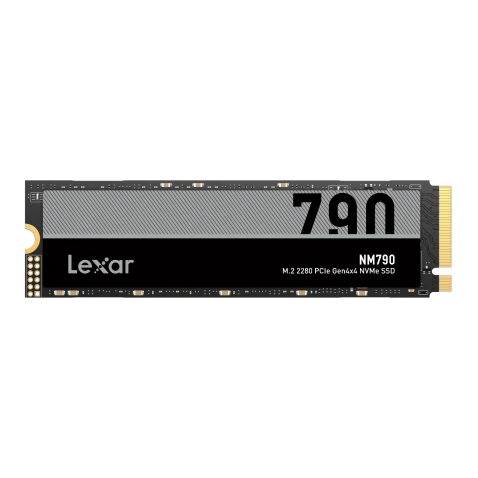
The Lexar NM790 with Heatsink provides a practical example of these specifications in a PS5-compatible M.2 2280 PCIe Gen4 x4 NVMe SSD.
It offers rated sequential read speeds of up to 7400MB/s and sequential write speeds of up to 6500MB/s, based on Lexar internal testing.¹ Its integrated heatsink helps manage SSD temperatures and supports sustained drive performance.
Available in 1TB, 2TB, and 4TB capacities, it provides additional space for a growing PS5 game library. Games installed on compatible M.2 expansion storage can run directly from the drive, making that extra capacity part of your everyday setup.
For another PS5-focused option, the Lexar PLAY 2280 PCIe 4.0 SSD also offers PS5 compatibility and an integrated heatsink designed to complement the console.
How Does SSD Speed Affect Game Loading?
Launching a game involves retrieving files and making their contents available to the system. Games can also request additional assets during play, including textures, objects, and audio as the player moves through the world.
Storage is one part of that process. The game engine, memory, data compression, and processing hardware also influence how quickly requested content becomes available.
Sony’s explanation of the PS5 SSD connects high-speed storage with its custom input/output system and decompression hardware. Together, these were designed to support fast data access and asset streaming.
For players preparing for GTA 6, this is useful context: the console accesses game data through a complete system. A storage specification becomes meaningful when considered alongside that system and the way the game uses it.
Does a Faster SSD Increase FPS?
Frame rate measures how many frames a game produces each second. The CPU, GPU, game engine, and selected graphics mode all contribute to that result.
An SSD supplies stored data to the system. Responsive storage can help where accessing new assets is a bottleneck, but a higher sequential read rating does not automatically raise a game’s frame-rate target.
Loading times, asset access, and FPS are different performance measures. When choosing an expansion SSD for PS5, focus on compatible storage that supports your game library, and judge claims about specific games using tests from the relevant console and game version.
How Fast Should a PS5 SSD Be?
For PS5 expansion, Sony recommends sequential read speeds of 5500MB/s or faster. The drive must also meet the console’s interface, physical-fit, and cooling requirements.
Advertised speeds describe performance under specified test conditions. A game may request data differently from a sequential benchmark, and the host platform affects the result.
Sony also notes that exceeding its recommended read speed does not guarantee every game will deliver exactly the same performance as the console’s built-in SSD. PS5 does not support Host Memory Buffer (HMB), so a feature available with a compatible PC host may not be used by the console.
Treat the published speed as a specification to check alongside compatibility and cooling, with actual gaming performance dependent on the full setup.
Why Does Cooling Matter?
SSD performance also depends on operating conditions. A heatsink helps move heat away from the drive, supporting thermal management during sustained activity.
Sony requires effective heat dissipation for a PS5 expansion SSD. A model with an integrated heatsink combines the drive and cooling structure in one assembly, simplifying the parts you need to select.
Before installation, compare the complete drive and heatsink assembly with Sony’s PS5 expansion requirements:
| What to check | Sony’s requirements |
| Interface | PCIe Gen4 x4 M.2 NVMe SSD, Key M |
| Capacity | 250GB–8TB |
| Supported form factors | 2230, 2242, 2260, 2280, and 22110 |
| Width, including cooling structure | Up to 25mm |
| Total thickness, including cooling structure | Up to 11.25mm |
| Clearance above and below the circuit board | Up to 8.0mm above; up to 2.45mm below |
The Lexar NM790 with Heatsink measures 80 × 24 × 9.7mm, while the Lexar PLAY 2280 PCIe 4.0 SSD measures 80 × 24 × 10mm (L × W × H). Both include integrated heatsinks and fit within Sony’s overall size limits for PS5 expansion.

Get Your PS5 Ready for GTA 6
Understanding SSD speed helps turn a list of specifications into a useful upgrade decision. Read performance relates to accessing game data, write performance matters when installing or copying files, and effective cooling supports the drive during use. For PS5, those qualities need to come together in a compatible design.
For players adding space ahead of GTA 6, the Lexar NM790 with Heatsink combines PS5 compatibility with high-speed storage and an integrated cooling solution. Choose capacity around the games you play regularly, allowing room for new installations and updates as your library grows.
Before upgrading, review your available space and follow Sony’s installation guidance for your console model. With a compatible SSD selected and installed, you can make room for your next adventure while keeping more of your current favorites ready to play.
General Installation Notes
Compatibility check before installation: Confirm the motherboard M.2 slot is compatible with this product (PCIe Gen4 x4 NVMe M.2 specification), and refer to the motherboard manual to confirm the slot location. Do not force the installation if it is not compatible.
M.2 slot location: Install the drive in the M.2 slot closest to the CPU. Performance may differ between slots; refer to the motherboard specification page for details.
Secure mounting: Align the thermal pad and tighten the fixing screw. Check the slot for dirt or foreign objects to avoid poor contact that affects performance.
External use: If using the SSD in an enclosure, use a Lexar enclosure or a high-performance enclosure to prevent the enclosure's specifications from limiting SSD performance.
PS5 read speed: This product is a Gen4 SSD, which the PS5 can recognize normally and run at its rated read speed. A Gen3 drive cannot meet PS5 requirements and will display "below minimum specification."
Formatting a new drive for PS5: When installing a brand-new SSD into the PS5 for the first time, the console will prompt for formatting on startup. Follow the prompt to complete formatting before normal use.
¹ Advertised speeds are based on Lexar internal testing and are not PS5 benchmark results. Actual performance varies by host platform, configuration, and usage conditions.