


What MicroSD Card Should You Buy for Insta360 Luna Ultra?
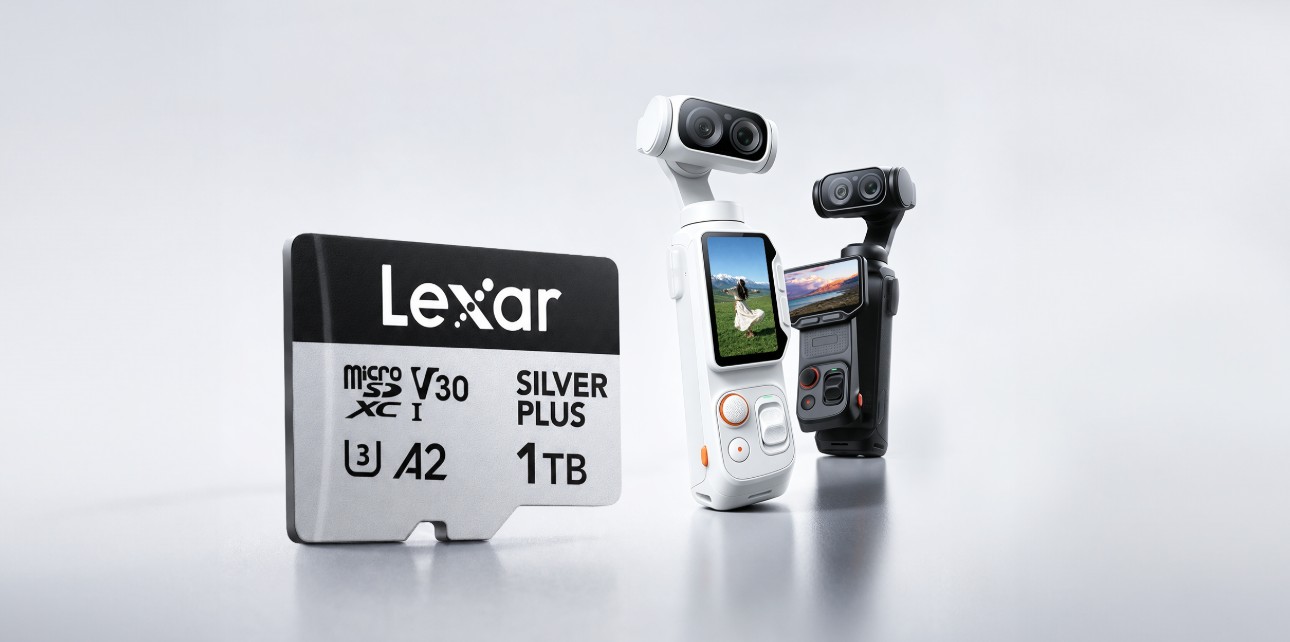
The Luna Ultra ships with 47GB of internal storage—but with 8K/30fps video and a 1-inch Leica sensor, you'll fill that in minutes. Here's what to know before you buy a card.
Does the Insta360 Luna Ultra's Built-in Storage Cut It?
The Insta360 Luna Ultra comes with 47GB of internal storage, allowing you to start shooting straight out of the box. However, high-resolution recording—particularly 8K video—can fill that space quickly.
| Recording Mode | Approx. Recording Time on 47GB Internal Storage |
| 8K/30fps | About 35 minutes |
| 4K/60fps | About 104 minutes |
| 4K/120fps | Varies depending on recording settings |
| 4K/30fps | Varies depending on recording settings |
Source: Insta360 official storage guidance. Actual recording time may vary depending on shooting conditions, camera settings, and available storage space.
For short clips and casual recording, the built-in storage provides useful flexibility. But when shooting extended 8K footage, Dolby Vision HDR, or 4K/120fps slow motion, available space can disappear quickly—and the last thing you want in the middle of a shoot is a “storage full” warning.
That is where a high-capacity microSD card comes in.
microSD Card Compatibility Requirements
For stable recording performance, Insta360 recommends using a microSD card that meets the following requirements:
- UHS-I interface
- V30 speed class or higher
- exFAT file format
- Capacity of up to 1TB
- Cards that do not meet the required speed rating may cause recording interruptions or file corruption. UHS-II and UHS-III cards, as well as cards exceeding 1TB, are not recommended due to potential compatibility issues.
- For most creators, a 256GB or 512GB card provides a practical balance between capacity and convenience. A 1TB card is better suited to extended 8K recording, multi-day shoots, or workflows where frequently transferring footage or changing cards would be disruptive.
What Specs Actually Matter for the Insta360 Luna Ultra?
Choosing a microSD card for the Insta360 Luna Ultra is not simply about buying the card with the highest advertised speed. Interface, sustained write performance, capacity, and device compatibility all matter.
1. Interface and Speed Class: UHS-I and V30
Insta360 recommends a UHS-I microSD card rated V30 or higher and formatted as exFAT.
The V30 rating guarantees a minimum sustained write speed of 30MB/s, helping the card maintain stable recording during high-resolution video capture. Cards that do not meet this requirement may cause recording interruptions or file corruption.
Avoid UHS-II and UHS-III cards. Although they may advertise higher speeds, Insta360 warns that they may have compatibility issues with the Luna Ultra.
2. Capacity: Choose Between 128GB and 1TB
The Luna Ultra supports microSD cards with capacities of up to 1TB.
- 64GB: Suitable for short sessions or occasional recording
- 128GB: A practical entry point for casual creators
- 256GB: A strong everyday choice for regular 4K and occasional 8K recording
- 512GB: Better for travel, extended shoots, and frequent high-resolution recording
- 1TB: Best for multi-day projects and workflows where frequent file transfers are inconvenient
- For most creators, 256GB or 512GB offers the best balance between capacity and convenience.
- Do not use cards larger than 1TB. Although higher-capacity cards are available, Insta360 states that cards exceeding 1TB may cause compatibility issues or interrupted recording.
3. Sustained Write Performance Matters More Than Headline Speed
Maximum read and write figures do not tell the whole story.
Read speed mainly affects how quickly footage can be transferred to a computer when using a compatible card reader. For recording, the more important specification is the card’s sustained write performance, represented by its Video Speed Class.
A UHS-I V30 card meets Insta360’s published recording requirement. There is no need to recommend V60 or UHS-II cards for the Luna Ultra, especially since Insta360 specifically advises against using UHS-II and UHS-III cards.
Lexar Professional SILVER PLUS microSD: A Practical UHS-I V30 Option
The Lexar Professional SILVER PLUS microSDXC UHS-I Card meets the Luna Ultra’s fundamental interface and speed-class requirements when formatted as exFAT.
Key specifications relevant to Luna Ultra users include:
- Interface: UHS-I
- Video Speed Class: V30
- Application Performance Class: A2
- Performance: Up to 205MB/s read and 150MB/s write
- Software support: Lexar Recovery Tool
- Durability: Designed to resist water, temperature extremes, shock, vibration, X-rays, and magnetic exposure
- The card’s maximum transfer speeds can also help reduce offload time when paired with a compatible high-speed card reader. Actual in-camera performance will depend on the camera’s host interface and recording settings.
- Insta360 officially recommends the Lexar Professional 1066x microSD UHS-I SILVER Series for the Luna Ultra. As its newer-generation counterpart, the Lexar Professional SILVER PLUS microSD card offers higher maximum read and write speeds while meeting the camera’s UHS-I and V30 requirements. Users can choose between the two based on local availability, purchasing channels, and price.
How Much Storage Do You Actually Need?
Insta360 states that the Luna Ultra’s 47GB of internal storage provides approximately:
- 35 minutes at 8K/30fps
- 104 minutes at 4K/60fps
- The following estimates scale those official figures according to card capacity.
The following estimates scale those official figures according to card capacity.
| Card Capacity | Estimated 8K/30fps Recording | Estimated 4K/120fps Recording | Estimated 4K/60fps Recording | Estimated 1080p/240fps Recording | Estimated 1080p/60fps Recording | Estimated JPEG+RAW Photos | Estimated JPEG Photos |
| 64GB | About 1 hour 3 minutes | About 1 hour 3 minutes | About 1 hour 22 minutes | About 1 hour 43 minutes | About 1 hour 57 minutes | About 847 photos | About 8,911 photos |
| 128GB | About 2 hours 7 minutes | About 2 hours 7 minutes | About 2 hours 44 minutes | About 3 hours 28 minutes | About 3 hours 54 minutes | About 1,689 photos | About 17,822 photos |
| 256GB | About 4 hours 14 minutes | About 4 hours 14 minutes | About 5 hours 29 minutes | About 6 hours 56 minutes | About 7 hours 49 minutes | About 3,399 photos | About 35,644 photos |
| 512GB | About 8 hours 41 minutes | About 8 hours 41 minutes | About 11 hours 16 minutes | About 14 hours 14 minutes | About 16 hours 3 minutes | About 6,968 photos | About 71,288 photos |
| 1TB | About 17 hours 23 minutes | About 17 hours 23 minutes | About 22 hours 34 minutes | About 28 hours 30 minutes | About 32 hours 8 minutes | About 13,936 photos | About 142,576 photos |
Source: Lexar Quality Lab.
These figures are not card-by-card laboratory test results. Actual recording time may vary depending on available formatted capacity, recording mode, codec, color profile, firmware, camera temperature, and shooting conditions.
For most users:
- 128GB is suitable for shorter sessions.
- 256GB is a practical everyday choice.
- 512GB provides more flexibility for travel and extended shoots.
- 1TB is best for high-volume recording or multi-day projects.
What About the Lexar Recovery Tool?
The Lexar Recovery Tool is available as a free download for Windows and macOS. It is designed to help recover files that have been accidentally deleted from compatible storage devices.
Recovery is never guaranteed. Successful recovery depends on whether the deleted data has already been overwritten. If footage is accidentally deleted, stop recording to the card immediately and begin the recovery process as soon as possible.
The tool should be treated as an additional safeguard rather than a replacement for regular backups. Important footage should still be copied to a second storage device as soon as practical.
Quick Buying Guide
For the Insta360 Luna Ultra:
- Choose a UHS-I microSD card rated V30 or higher.
- Format the card as exFAT.
- Do not use UHS-II or UHS-III cards.
- Do not exceed the camera’s 1TB capacity limit.
- Consider 256GB for regular use or 512GB for extended shooting.
- Choose 1TB for multi-day projects or frequent 8K recordings.
- Prioritize the V30 sustained-write rating over headline maximum speeds.
- Check Insta360’s latest device-specific compatibility list before purchasing.
- The Lexar Professional SILVER PLUS meets the published UHS-I and V30 requirements in capacities up to 1TB
Source: Insta360 official product page, Lexar Quality Labs. Specifications current as of June 2026.